

简介
安装了 Chrome 的 FireShot 插件,却发现系统里多了可疑的 .exe 文件?卸载插件后还留着后台进程和文件夹,清理不干净?这篇文章教你用一键 PowerShell 脚本,轻松彻底清除 FireShot 插件的所有残留,操作简单又安全,特别适合注重系统干净和隐私的朋友们。FireShot 插件的先进功能会额外写入系统目录的可执行文件,普通卸载没法清理干净。用本文的脚本,一键搞定所有缓存和后台程序,让你的电脑干净又放心。
教程
创建PowerShell 脚本
将以下代码复制,然后到新建文本文件TXT当中粘贴进去
# PowerShell FireShot 清理脚本 - By ChatGPT

Write-Host "`n=============== 开始清理 FireShot 相关内容 ===============" -ForegroundColor Cyan

# 强制结束 FireShot 相关进程
Write-Host "`n[1] 正在尝试结束相关进程..." -ForegroundColor Yellow
$fsProcesses = Get-Process | Where-Object { $_.Name -like "*fireshot*" -or ($_.Path -like "*fireshot*" -and $_.Path) } 2>$null
if ($fsProcesses) {
    $fsProcesses | ForEach-Object {
        try {
            Stop-Process -Id $_.Id -Force -ErrorAction SilentlyContinue
            Write-Host "已结束进程:$($_.Name)" -ForegroundColor Green
        } catch {
            Write-Host "⚠ 无法结束进程:$($_.Name)" -ForegroundColor Red
        }
    }
} else {
    Write-Host "未检测到相关进程。" -ForegroundColor DarkGray
}

# 要清除的路径集合
$paths = @(
    "$env:ProgramFiles\FireShot",
    "$env:ProgramFiles(x86)\FireShot",
    "$env:LOCALAPPDATA\FireShot",
    "$env:APPDATA\FireShot"
)

Write-Host "`n[2] 正在删除相关文件和文件夹..." -ForegroundColor Yellow
foreach ($path in $paths) {
    if (Test-Path $path) {
        try {
            Remove-Item -Path $path -Recurse -Force -ErrorAction Stop
            Write-Host "✅ 删除成功:$path" -ForegroundColor Green
        } catch {
            Write-Host "❌ 无法删除:$path,可能被占用或无权限。" -ForegroundColor Red
        }
    } else {
        Write-Host "已跳过(路径不存在):$path" -ForegroundColor DarkGray
    }
}

# 删除 Temp 中的 fireshot 缓存
Write-Host "`n[3] 清理 Temp 中 fireshot 缓存..." -ForegroundColor Yellow
Get-ChildItem "$env:TEMP" -Recurse -Force -ErrorAction SilentlyContinue | Where-Object {
    $_.Name -like "*fireshot*" -or $_.Name -like "*screenshot*"
} | ForEach-Object {
    try {
        Remove-Item $_.FullName -Force -ErrorAction Stop
        Write-Host "✅ 删除缓存文件:$($_.FullName)" -ForegroundColor Green
    } catch {
        Write-Host "❌ 无法删除缓存文件:$($_.FullName)" -ForegroundColor Red
    }
}

Write-Host "`n=============== 清理完成! ===============" -ForegroundColor Cyan
Write-Host "如仍有残留,可重启进入安全模式或使用 IObit Unlocker 手动清理。" -ForegroundColor Gray
保存为 PowerShell 脚本
把文件名保存为 清理FireShot.ps1

管理员身份运行 PowerShell 执行脚本
右键点击左下角的 开始 ,点击 选择 Windows PowerShell(管理员)打开 ,设置临时策略(避免脚本被拦截)
Set-ExecutionPolicy -Scope Process -ExecutionPolicy Bypass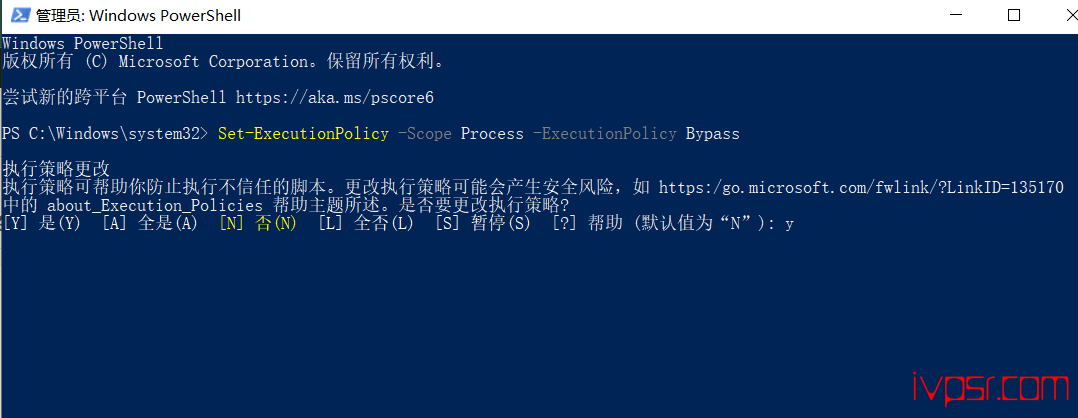
接着进入你所在的文件目录来运行脚本,我这里是放在了Downloads目录
cd C:\Users\替换成你的用户名\Downloads

.\清理FireShot.ps1